A modern, open-source media center built so that everyone can use it — including the people the industry keeps forgetting.
The Inspiration: My Father’s Media Library
For as long as I can remember, I have loved movies, TV shows and music. I’ve been collecting since I was a little kid — VHS, then DVDs, then Blu-rays, physical copies of everything I cared about. It was also how my father and I bonded.
He once shared with me that his childhood home was right next to the only movie theater in the small town of Toa Baja, Puerto Rico, during the early 1950s. He dreamed of having his own home theater one day, just as DVDs were beginning to emerge. After telling me this story, he mentioned that he would like to start a DVD collection. A few weeks later, he bought the Godzilla movie from 2000 on DVD, along with a brand-new DVD player.
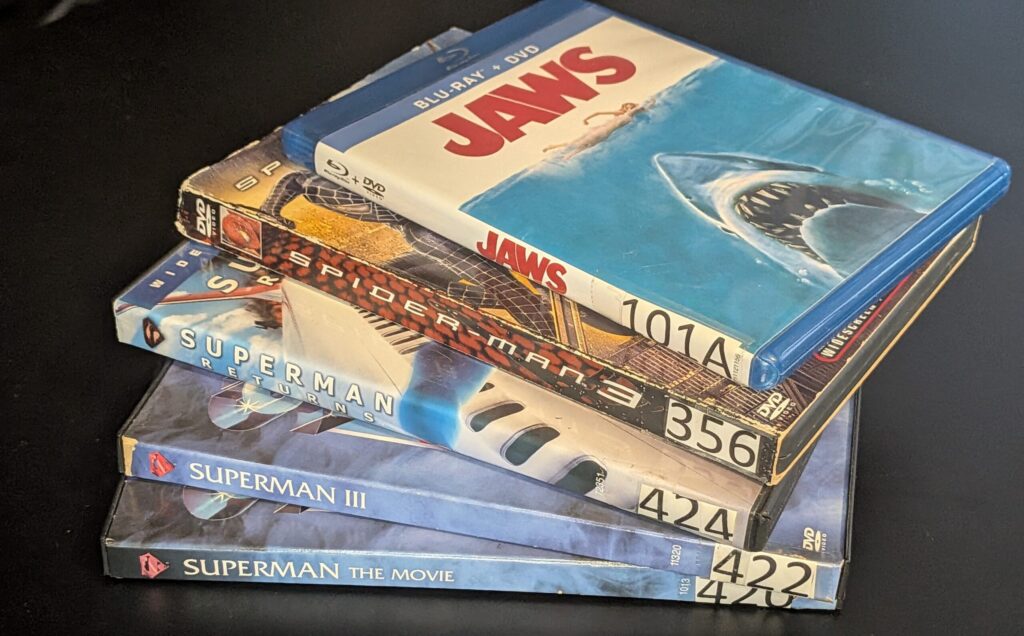
From that day on, he built a massive collection. He would buy a movie, assign it a number and then index it in two notebooks. In one notebook the movies were in alphabetical order; in the other, they were in ascending order by the number they had been assigned. The collection grew to thousands of movies. On Saturday nights we would look for a movie, burn some popcorn and watch something from the collection.
Since I have always been blind, my father also took it upon himself to create a huge Microsoft Word document on his computer with a copy of the notebooks, so that I could find the movies I wanted too. He also put stickers with different colors and textures on the DVD player so that I would know what each button was. My father was doing accessibility work by hand, for his son, in his living room. That made a great impression on me as a child. Back then, I thought: “This will all be mine one day, and I will continue the tradition.”
Sadly, my father developed dementia after suffering a stroke in 2009. He passed away in 2020. His collection was sold, except for a few movies that I held on to. I still have some of those movies.
Building My Own Media Center: self-hosted, accessible, family-oriented, and high-quality playback
As an adult, I decided to start my own collection. Then I decided to give Plex a try to host all my movies so I could watch them. A bit later, I also tried Jellyfin, but none of the available options gave me what I wanted.
Plex came very close to being the option I stuck with. My wife and I met online, and the watch-together feature Plex used to have was amazing for us. It let us watch movies together in a really nice way. However, the accessibility of both Plex and Jellyfin just wasn’t there. After many attempts to fix it within those platforms, I decided to build my own. At the time, I thought, “It doesn’t seem that hard.”
It has taken me about five years to build — though in truth, I have been trying to do this since 2019 — and as it turns out, it is not easy at all. Learning about FFmpeg, understanding HLS, learning about media codecs and many other topics that don’t fit in this article has been very difficult. My experience as a professional software developer is mostly with web technologies and mobile applications built with React Native. Building a media streaming platform meant for self-hosters has been a humbling journey.
The name “Igloo” was my wife’s idea. She came up with the name because I am the BlindPenguin, and an igloo is where I go to relax and enjoy myself.
Igloo’s purpose is the same idea my father had: a library, carefully kept, that the whole family can use. The numbers and the two notebooks became a database and a search box. And because I’m a blind programmer and I’m the one building it, it carries the other half of his tradition forward too. The Word document and the textured stickers are now screens.
Why Not Just Contribute to Jellyfin?
A question I get asked frequently is: why not contribute to Jellyfin instead? The short answer is that, while I took inspiration from both Jellyfin and respect what they’ve built, Igloo isn’t a clone of it. It’s the media center I wanted to exist: simple, fast, good-looking, powerful, and genuinely excellent with a screen reader. I’m building the media center I need, and it appears many others might need it too—millions of people who use assistive technology as well. Accessibility has historically been an afterthought, not necessarily out of malice, but just because nobody in the room needed it. I’m in the room. I need it. That’s the difference. And if Igloo also pushes larger projects to take accessibility more seriously, that’s a win for everyone
This is my passion project. My family and I use it constantly — that’s the real test, and it’s the reason it’s gotten this far. It’s also the point. My father’s library was something he shared with me; Igloo is the version I get to share with my own family, and the one I want to share with my son, as my father did with me. I’m going to keep going until it’s the best media center on the market.
Accessibility Is How Our Media Center Is Built
Most software treats accessibility as a phase near the end — a pass where somebody sprinkles aria-label on the buttons that were obviously missing one and calls it done. Igloo was built the other way around: accessibility is a rule the codebase enforces on itself, written down in a design system document that every part of the interface has to answer to.
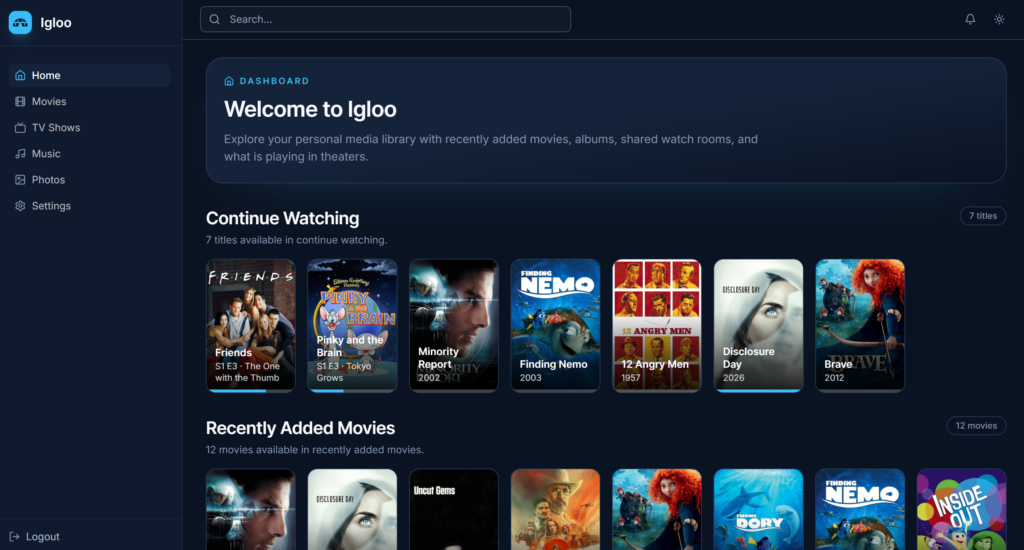
Every poster on the home screen announces itself completely: not “Toy Story 4,” but “Toy Story 4, 2019, 94% watched.” The play control next to it is separately labeled — “Resume Pinky and the Brain, S1 E3, Tokyo Grows” — so you never have to guess which button belongs to which title. Each row tells you its size before you enter it: “12 movies available in recently added movies.”
A dense page doesn’t get one skip link; it gets seven. On a movie page you can jump straight to the overview, the crew, the cast, the chapters or the extras, instead of tabbing through all of it to reach the part you wanted.
And the horizontal rows — the carousels that break screen reader navigation in almost every media app I’ve tried — come with instructions: “Chapters scroll horizontally. Use Tab to move between chapter links. On touch devices, swipe or scroll the list to see all chapters.” Somebody has to decide that sentence is worth writing. That’s the difference between meeting a standard and actually being usable.
Underneath, that’s roughly 800 ARIA attributes across the web client, live regions announcing scan progress and playback state as they change, and a full keyboard path through every screen — including the video player, which is where most media apps give up entirely.
And here’s the part I actually care about: none of this made the app worse for sighted users. That’s the myth I want to kill. Accessible design is just good design with the excuses removed. Clear labels help everyone. Predictable focus helps everyone. A player you can drive from the keyboard is faster for a power user than one you can’t.
Igloo is meant to be beautiful and usable. Not one at the cost of the other.
Playback Without Compromise: Self-Hosting a High-Quality Audio and Video Library
Media playback is another area where, in my opinion, Igloo stands above the competition. I have used everything out there — Jellyfin, Plex, Kodi, Jellyfin with the Infuse player and more — and none of them has been able to play back media reliably the way I want.
A good example is Jellyfin with Infuse on an Apple TV. That combination is quite good, since it can play almost any video or audio codec out there, with one major exception. Apple TV doesn’t support audio codecs like Dolby TrueHD Atmos or DTS-HD Master Audio, so Infuse converts them into high-quality audio such as 5.1 LPCM, or into a Dolby codec compatible with your sound system. For owners of 4K Blu-rays with Atmos content, that means we lose the Atmos. Some people may come at me saying that Infuse does support Atmos, and they’re right — but only in the E-AC-3 codec, which in my experience Blu-ray releases rarely use for the main feature.
With Igloo, I strive to make sure your media plays at the best quality possible through direct playback — and when it can’t, there are several ways for you to still enjoy your movie in high quality. My own setup is a good example. In my living room I have a 65-inch Samsung TV from 2021, a Sonos Arc in a 5.1.2 setup and an NVIDIA Shield. When the Shield sends a DTS-HD MA audio stream, my system turns it into stereo PCM, which is not what I want. In Igloo, I give you the choice to convert it to AC-3 at 640 kbps or to high-quality E-AC-3, so you can still enjoy great sound.
For now, Igloo will not have an Apple TV client, because Apple TV doesn’t meet the standard I want for this application. I need Igloo to play back media at its highest quality, and right now Apple TV does not support TrueHD or DTS audio. That means Apple TV is not part of the Igloo roadmap for now — but I am willing to change my mind if people request it.
One Media Center, Three Apps
Igloo isn’t a single program. It’s a small family, and they’re all being built to the same standard.
-
- The server and web client — a Go server with a React front end. This is the heart of the project: it scans your libraries, manages your users, handles transcoding and streams your media. The web client is what you get in a browser on any device.
-
- The Android TV client — written in Kotlin, for the television, and shipping with the first beta this fall. This one matters a lot to me. The living room is exactly where accessible media software tends to fall apart, and it’s also where most people actually watch things.
- The mobile app — a React Native client for phones and tablets, coming early next year.
The Hardest, Most Rewarding Thing I’ve Built: Our Media Center and the Company’s Compromise to Open Source
This has been the most difficult project I have ever worked on, but also the most rewarding. Five years of nights, weekends, and every spare moment have gone into turning an idea that means a great deal to me and my family into reality. I have an enormous appreciation for the open-source developers, like the Jellyfin and Immich teams. The purpose of this project, as with every other BlindPenguin’s endeavor, is to create great-quality open-source software while generating an income for my family, and to show the world that open-source software is possible and not just some crazy, idealistic dream.
Igloo is currently hosted on GitHub at github.com/jibanez74/Igloo, and the website is igloomediacenter.com. Eventually, the project will move to a self-hosted Forgejo instance, where BlindPenguin will host all of its projects. You can read it, run it, fork it, or tell me everything I got wrong. All four are welcome. I believe strongly in what I’ve built, but I’m also nervous about how it will be received and aware that there will be things to improve. More than anything, I’m excited to finally put Igloo into people’s hands and see what they do with it.
What’s Next For Igloo: Expanding the Possibilities for our Self-Hosted Media Center
The first beta arrives this fall, and three things land together:
-
- The Android TV client, so the living room is covered from day one.
-
- Real downloads. No Go toolchain, no build step. You install it.
-
- The project website — documentation, download links for each client, contribution guides, and a way to support the work if you want to.
The mobile app follows early next year — React Native, for phones and tablets. That’s the last of the three clients.
The goal is to have a stable version 1.0.0 ready for spring 2027, including the React Native mobile client.
How You Can Help
Until the beta arrives, here’s how you can get involved:
-
- Follow along. Any of the accounts below. When the beta lands, that’s where it gets announced first.
-
- If you write code, the repository is public right now, and you can build it from source today at github.com/jibanez74/Igloo. Bug reports and pull requests are open.
And one specific request: if you use a screen reader, I want to hear from you. Not after launch — now, while the interface is still soft enough to change. I’ve built Igloo to work the way I need it to work, and I’m one person with one set of habits and one screen reader. You will find things I can’t. That makes you the most valuable contributor this project can get, and it’s the reason I’m publishing this before the beta rather than after.
You can find BlindPenguin here:

-
- LinkedIn: @blind-penguin-llc
-
- Instagram: @blindpenguincoder
-
- TikTok: @blind.penguin.cod
My father kept his library in two notebooks, a Word document and a handful of textured stickers. My self-hosted media center took five years and about ninety thousand lines of Go. Same tradition, different tools — and a stubbornness I probably got from him.
This fall, you’ll be able to try it.
See you then.
— José Ibáñez, BlindPengui